
Store Your Group's Important Contact Information in One Easy-to-Find Place
Every club, team and organisation has important people that members need to be able to contact.
Invitem's Contact Details feature gives hosts a dedicated space within the Group Info Hub to store and share important contact information with members.
Hosts can add up to two separate sets of contact details, making it easy to provide different contacts for different purposes, such as a club administrator and team manager, or a general contact and emergency contact.
The host can choose how much information to provide, from a simple name and telephone number to a complete contact record including email addresses, multiple phone numbers, address, Google Maps directions, Waze directions and additional notes.
Everything is kept together in one easy-to-find location inside the group.
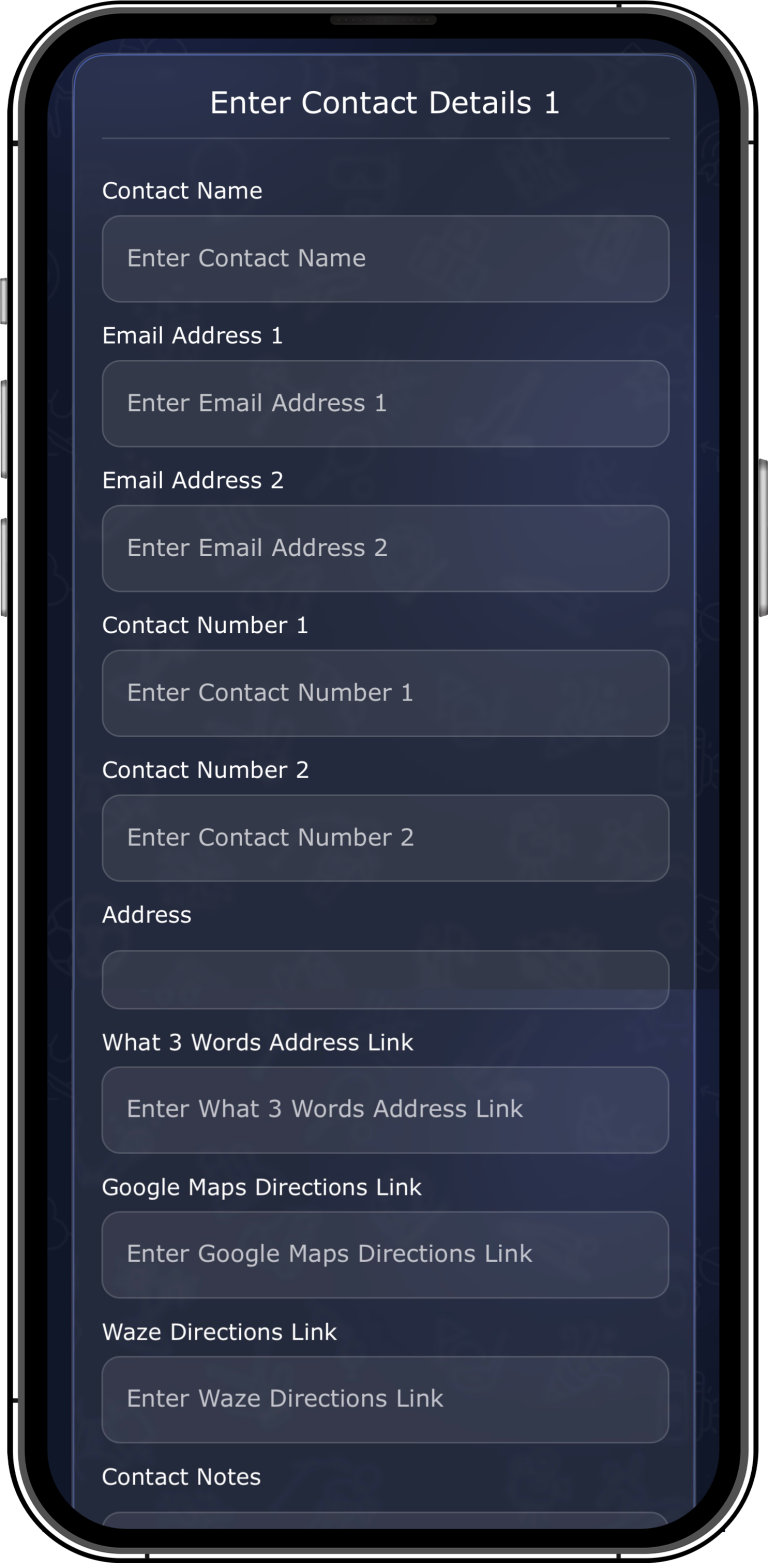
Add as Much or as Little Information as You Need
The Contact Details feature is completely flexible.
The host can provide only the information that members need, or create a detailed contact record containing multiple ways to get in touch.
Each contact can include:
- Contact Name
- Email Address
- Second Email Address
- Telephone Number
- Second Telephone Number
- Address
- What3Words Address Link
- Google Maps Directions
- Waze Directions
- Contact Notes
This makes the feature suitable for everything from a simple club contact to a detailed venue or organiser information page.
Two Contact Records in Every Group
Invitem provides space for two separate contact records, allowing hosts to organise important contacts without having to combine everything into one long entry.
For example:
Club Contact
Club Secretary
Email
Telephone
Website or address information
Team Contact
Team Manager
Email
Mobile
Venue directions
Additional notes
This gives members a clear and simple way to find the right person or information.
Give Members the Right Information
Important contact information shouldn’t be buried inside a group chat.
Instead, hosts can add it once to the Info Hub, where members know exactly where to find it whenever they need it.
This can be particularly useful for:
- Club Administrators
- Team Managers
- Coaches
- Committee Members
- Emergency Contacts
- Event Organisers
- Venue Contacts
- Travel Organisers
Members can return to the Contact Details section whenever they need the information.
Make Finding Venues Easier
Contact records can include several different location options.
Hosts can add a standard address along with links for What3Words, Google Maps and Waze.
This is particularly useful for sports clubs that regularly use different venues, training grounds or event locations.
Members can simply use the relevant directions link rather than searching for the location themselves.
Add Important Notes
The Contact Notes section gives hosts space to add additional information that doesn’t fit into the standard contact fields.
This could include useful instructions, opening information, meeting arrangements, parking details or anything else members may need to know.
The host can add up to 2,000 characters of notes, giving plenty of room for detailed information when required.
A Simple Example
A football club could use the first contact record for the Club Secretary, including their email address and telephone number.
The second could be the Team Manager, including their mobile number, training venue address and Google Maps link.
A member looking for help with club administration knows exactly where to find the secretary’s details, while someone trying to find training can quickly access the team manager and venue information.
No searching through old messages.
No asking the group chat.
The information is already there.
Why Clubs Use Group Contact Details
| Traditional Contact Information | Invitem Contact Details |
|---|---|
| Information buried in messages | Dedicated Info Hub section |
| Difficult to find later | Always easy to locate |
| One contact may be insufficient | Two separate contact records |
| Limited information | Multiple contact fields |
| Separate map messages | Maps and navigation links |
| Repeatedly send information | Add once for the whole group |
Invitem keeps important contact information organised and accessible, helping members find the right person and the right information when they need it.
Perfect For
Invitem has been designed to support clubs, teams and organisations of all sizes, making it the ideal solution for:
- Football Clubs
- Soccer Clubs
- Ice Hockey Clubs
- Baseball Clubs
- Basketball Clubs
- Hockey Clubs
- Rugby Clubs
- Cricket Clubs
- Tennis Clubs
- Swimming Clubs
- Netball Clubs
- Martial Arts Academies
- Dance Schools
- Scouts and Youth Groups
- Schools
- Universities
- Community Organisations
- Charities
- Social Clubs
Whether you’re providing contact information for a football team manager, hockey club secretary, swimming coach, dance school administrator or community organisation, Invitem gives members one simple place to find the information they need.
Frequently Asked Questions
Where do members find the Contact Details?
Contact Details are located within the group’s Info Hub, alongside the other group information and features.
How many contacts can the host add?
The host can add two separate sets of contact details to each group.
Can I add just a name and phone number?
Yes. The feature is completely flexible and the host can provide as little or as much information as required.
Can I add multiple phone numbers?
Yes. Each contact record has space for two contact numbers.
Can I add multiple email addresses?
Yes. Each contact record can contain two email addresses.
Can I add directions?
Yes. Hosts can add the address along with What3Words, Google Maps and Waze direction links.
Can I add additional information?
Yes. The Contact Notes section allows hosts to provide additional information and instructions.